

Pscan on Chromebook

Replied by Twffr on topic Pscan on Chromebook

Posted 1 year 10 months ago #208053
I followed the Linux installation instructions on the pscan website. I'm using a Debian Linux distribution not ChromeOS. 

I downloaded pscanloader to $/Downloads/ from my Web browser.

Using the desktop graphical file app, I navigated to Downloads in my home directory.

I right-clicked pscanloader and dropped to Properties then to Permissions. I then selected the executable option then OK.

I hadn't used the terminal to make these changes and only opened it to check membership of the dialout group - again, instructions on pscan website.

A double-click on psacanloader file from the desktop file browser (app) runs the program as expected, initially downloading the pscanapp and the licence.

Being a Linux newbie I had previously moved the pscanloader to a directory for which I didn't have permissions and it couldn't download the additional programs. Keeping it in one of the /home/ directories was the solution. A note to that effect in the instructions could be useful to another novice!

I'm extremely pleased with my pscan.

Good luck!
by Twffr

Please Log in or Create an account to join the conversation.

Replied by Fireline on topic Pscan on Chromebook

Posted 1 year 10 months ago #208055
My problem at the moment is that if I right click on Pscanloader, I don't get an entry for "Properties!" I have the loader on the machine, but it won't open no matter what I do. If I double click it, it downloads another copy instead!

Please Log in or Create an account to join the conversation.

Replied by Twffr on topic Pscan on Chromebook

Posted 1 year 10 months ago #208059
My guess this a web link not the actual file. Look again at how you are downloading from the website. You may only be copying the link. Check your browser help if you ate unsure.
by Twffr

Please Log in or Create an account to join the conversation.

Replied by Twffr on topic Pscan on Chromebook

Posted 1 year 10 months ago #208064
I've just climbed out of another rabbit hole called chromeos! Seems that Linux only works in ChromeOS through the command line terminal and not through the graphical interface (which is just the Chrome browser). But the pscan website has the terminal commands you need.

But I still think your first problem is getting the Chrome web browser to download the actual pscanloader program. I suspect Chrome only wants to download from the Play/Chrome store. I haven't found information to change that.

Good luck. Chris 
by Twffr

Please Log in or Create an account to join the conversation.

Replied by Fireline on topic Pscan on Chromebook

Posted 1 year 10 months ago #208069
Thanks. The file is downloading, because I can see it saved on the system with a file size. However, I don't know what to type into the terminal to get it to open in Linux. I don't know if it's something I'm doing, or just something so simple that I'm not seeing it.

Please Log in or Create an account to join the conversation.

Replied by Roverlike on topic Pscan on Chromebook

Posted 1 year 10 months ago #208070
To run .exe files on Chromebook you need to install Wine or CrossOver emulator within Linux Penguin. Have you done that? What emulator you installed?

Please Log in or Create an account to join the conversation.

Replied by Fireline on topic Pscan on Chromebook

Posted 1 year 10 months ago #208071
Ah, I haven't done that. It didn't say anything about it in the Pscan site instructions! Right, how do I go about doing that?

Please Log in or Create an account to join the conversation.
Replied by Roverlike on topic Pscan on Chromebook

Posted 1 year 10 months ago #208073
That is not part of pscan instruction. That is specificity of Chromebook itself. You would need to go to Google Play store and download one of them, if I am not mistaken. 
i am not Chromebook owner, I am merely reading what is written from Google. Chromebook is Google product.

Please Log in or Create an account to join the conversation.

Replied by Fireline on topic Pscan on Chromebook

Posted 1 year 10 months ago #208088
I have now installed Crossover, and it seems to be in the system properly, and yet double clicking on the Pscanloader file just downloads another copy of it! Think I might just give up.

Please Log in or Create an account to join the conversation.

  • Cobber
  • Offline
  • Moderator
  • Moderator
    Registered
  • '97 MGF 1.8 MPI
  • Posts: 4449
  • Thanks: 1691

Replied by Cobber on topic Pscan on Chromebook

Posted 1 year 10 months ago #208089
I have a simple solution that is cheap and cheerful......... find yourself an cheap old windows laptop which you dedicate to diagnostic duties,  as a bonus  you wont care if it gets grease and crap all over it and it it wont be the end of the world if you drop it or some other drama befalls it!


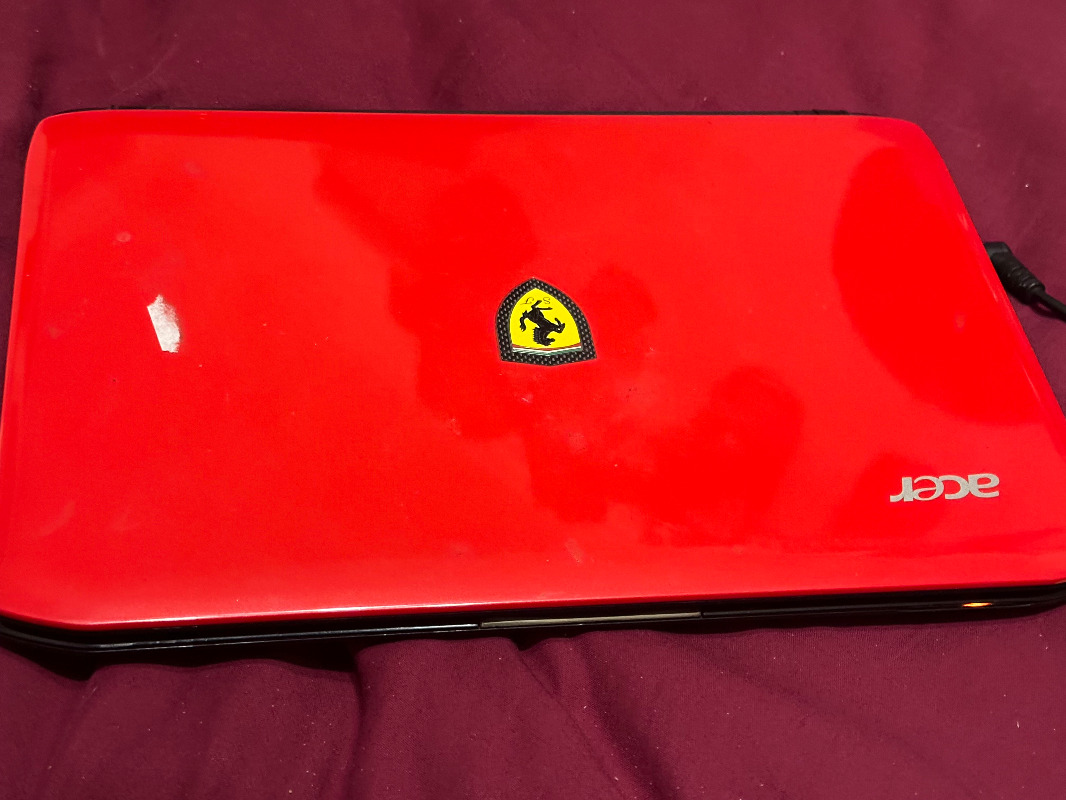
This is the one I currently use for all diagnostic apps. it cost me next to nothing as it was given to me with a buggered hard drive, so I threw a new SSD (for reliability and robustness)in it and set it up with Windows 10 (it was originally built running 7) None of my personal data is kept on it, if and when it needs to go online it is protected by Avast (a free antivirus App) not that there is anything on this machine that would be of any interest or use to a malicious actor.
I've been using this for @ 5 or so years, with out any drama. It's small enough to easily use and carry in the car.

It's also amusing to see the look on spectators faces when they see I'm using a "Ferrari" laptop for diagnosing my MG, Ford or whatever.

"Keep calm, relax, focus on the problem & PULL THE BLOODY TRIGGER"

Last Edit:1 year 10 months ago by Cobber
Last edit: 1 year 10 months ago by Cobber.

Please Log in or Create an account to join the conversation.

Replied by Fireline on topic Pscan on Chromebook

Posted 1 year 10 months ago #208093
I may yet have to. I don't want Pscan on my main laptop as it is a large screen one (so weighs quite a bit). I have this Chromebook kicking around, and hoped I could load it onto there. After buying the scan interface, I didn't want to have to shell out more on more tech!

Please Log in or Create an account to join the conversation.

Replied by Twffr on topic Pscan on Chromebook

Posted 1 year 10 months ago #208097
I understand that Crossover and Wine enable a Chromebook to behave like a limited Windows laptop.  I would have one more go and download the Windows 32 bit version of pscan onto a USB drive attached to your Windows laptop then transfer it to your Chromebook (within its Wine environment). Then proceed with the Windows installation. 

Otherwise, delete ChromeOS completely and replace with a very lite Linux distribution. Google is your friend to help you do that.

I'm using an ancient Acer EePC netbook and it's much, much easier to have in the car than a full sized laptop. Good luck.

 
by Twffr

Please Log in or Create an account to join the conversation.

Moderators: pscan.uk
Time to create page: 0.464 seconds