
Pscan on Chromebook


I may yet have to. I don't want Pscan on my main laptop as it is a large screen one (so weighs quite a bit). I have this Chromebook kicking around, and hoped I could load it onto there. After buying the scan interface, I didn't want to have to shell out more on more tech!
by Fireline
Please Log in or Create an account to join the conversation.


I understand that Crossover and Wine enable a Chromebook to behave like a limited Windows laptop. I would have one more go and download the Windows 32 bit version of pscan onto a USB drive attached to your Windows laptop then transfer it to your Chromebook (within its Wine environment). Then proceed with the Windows installation.
Otherwise, delete ChromeOS completely and replace with a very lite Linux distribution. Google is your friend to help you do that.
I'm using an ancient Acer EePC netbook and it's much, much easier to have in the car than a full sized laptop. Good luck.
Otherwise, delete ChromeOS completely and replace with a very lite Linux distribution. Google is your friend to help you do that.
I'm using an ancient Acer EePC netbook and it's much, much easier to have in the car than a full sized laptop. Good luck.
by Twffr
Please Log in or Create an account to join the conversation.

Great minds think alike @Cobber.

Old 32-bit Dell laptop, does the job. Win 7 and Linux on it.
Old 32-bit Dell laptop, does the job. Win 7 and Linux on it.
Last Edit:1 year 10 months ago
by Raccoon
Last edit: 1 year 10 months ago by Raccoon.
Please Log in or Create an account to join the conversation.
I am much closer now, but still no joy. I have got Crossover open, created the 64-bit bottle but the Linux Pscanloader doesn't come up on Crossover as an Installer program. Should I be trying to load the Linux version or the Windows version? Thanks.
by Fireline
Please Log in or Create an account to join the conversation.
Sorry, should have said that I launch the Windows pscan exe file from my downloads folder, via "Install with Crossover" tab. It opens, creates the bottle, says it is installing, even invites me to try Crossover. However, I then get a black command screen pop open, and this is soon followed by a message saying that pscanloader has encountered a serious problem, and needs to shut down. Crossover doesn't seem to recognise the file as an installer?
by Fireline
Please Log in or Create an account to join the conversation.
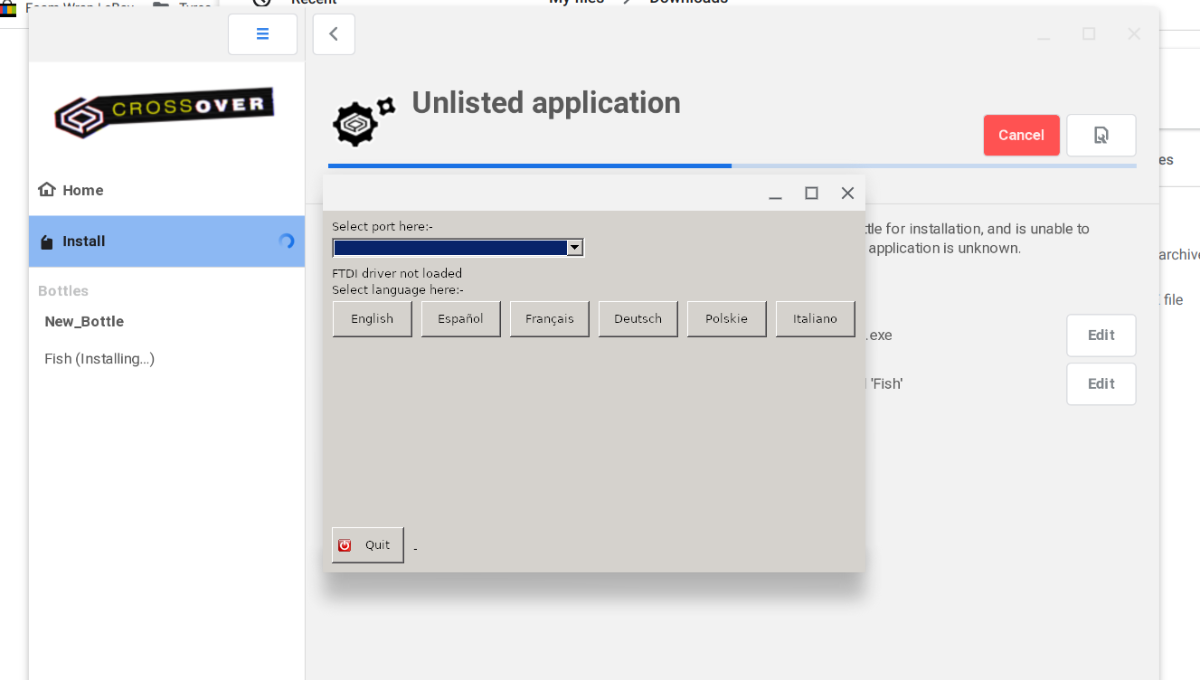
Kept beavering, and I have got even closer. I have got Crossover to accept the installer, I have even been prompted to accept the licence agreement, but when I open the drop down to choose port, there is nothing there, even though the pscan is plugged into the car! It does see the pscan initially when I plug it in, but it is not available in my files or settings menus, and I can't see any way to "force" recognition. Suspect a restart may help at this point. There is a green flashing light on the pscan. Just annoying to get so close, and....!
Last Edit:1 year 10 months ago
by Fireline
Last edit: 1 year 10 months ago by Fireline.
Please Log in or Create an account to join the conversation.
Please Log in or Create an account to join the conversation.


As it says on the screen: You do not have FTDI driver loaded.
if you used Windows version of the pscan, then you skipped the step where you should Install the device driver?
if you used Windows version of the pscan, then you skipped the step where you should Install the device driver?
by Roverlike
Please Log in or Create an account to join the conversation.
I used the Linux version of the loader, because I tried the windows version, and it didn't like that much. I also tried to download the driver when I was doing the windows version, and that didn't seem to work, either.
by Fireline
Please Log in or Create an account to join the conversation.
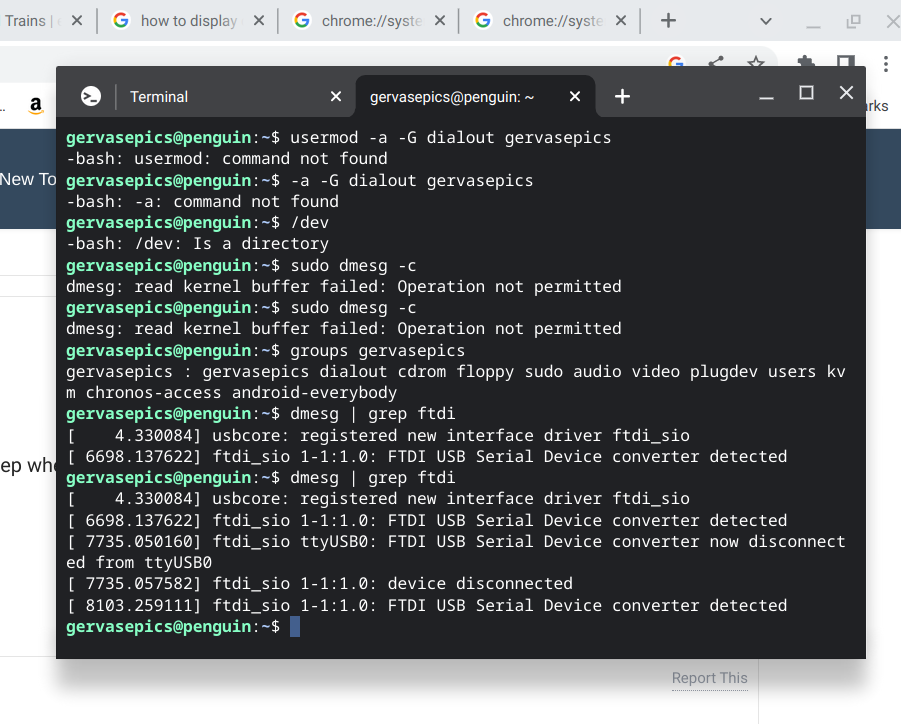
I also tried to add the driver, or get the system to recognise it, in Linux. It finds the device at port 0, but not when the dropdown menu to install pscan is opened.
by Fireline
Please Log in or Create an account to join the conversation.

you need to use the Linux version, because you are using a Linux FTDI driver (it seems to be already built into the Chromebook).
In your terminal cd to the directory where the pscanloader is.
Type
chmod 755 pscanloader
./pscanloader
In your terminal cd to the directory where the pscanloader is.
Type
chmod 755 pscanloader
./pscanloader
by pscan.uk
Please Log in or Create an account to join the conversation.
also, can you type
uname -a
so that I can see what kernel you have
uname -a
so that I can see what kernel you have
by pscan.uk
Please Log in or Create an account to join the conversation.
Moderators: pscan.uk
Time to create page: 2.799 seconds